
Afloat used to be a popular way to keep Mac windows always on top. But on modern macOS, it is no longer a reliable option. If you use Sonoma, Sequoia, Tahoe, or Apple Silicon, you need a modern Afloat alternative.
The problem is that many old forum posts, Reddit comments, and blog tutorials still mention Afloat as if it were a realistic option. That advice is mostly stale.
The short version: Afloat belongs to the old SIMBL era. Modern macOS users should use a current always-on-top app instead.
What Happened to Afloat?
Afloat became popular because it solved a real macOS gap: Apple never shipped a universal “keep this window on top” command for normal app windows.
Older versions of Afloat worked by integrating deeply with the Mac window system through SIMBL-style plugin injection. That was powerful, but it also depended on a very different macOS security model. The public Afloat installer repositories still talk about older OS X versions such as Yosemite and El Capitan, and some Sierra-era instructions require disabling System Integrity Protection.
That matters because modern macOS is built around stricter boundaries:
- System Integrity Protection blocks many old injection techniques.
- Hardened runtime and notarization changed how apps can modify other apps.
- Accessibility and Screen Recording permissions are now the normal way window tools interact with the desktop.
- Apple Silicon and newer macOS releases made abandoned plugin workflows even less practical.
So Afloat did not stop being interesting because the idea was bad. The idea was good. The implementation path aged out.
Does Afloat Still Work on macOS Sequoia, Sonoma, or Tahoe?
For practical daily use, no.
You may still find old Afloat forks, archived installers, or comments claiming that a particular workaround worked on an older system. But if you are using a current Mac, Afloat is not a dependable choice for always-on-top windows.
The main issues are:
| Problem | Why it matters |
|---|---|
| Old SIMBL-style architecture | Modern macOS blocks or discourages the plugin behavior Afloat relied on |
| SIP workarounds | Disabling system protections is not worth it for a window pinning feature |
| App compatibility gaps | Afloat historically did not work with every app or every window type |
| No modern product support | New macOS releases can break old hacks without a clear update path |
| Managed Macs | Work or school devices often block this class of modification entirely |
If the goal is simply to keep a reference window, meeting window, browser, PDF, Terminal log, or AI assistant visible, a modern tool is the safer route.
For broader background on why macOS still lacks this feature, read the macOS always-on-top landscape guide.
Best Afloat Alternatives for Modern macOS
The right replacement depends on what you wanted from Afloat in the first place. Most people wanted one of three things:
- A simple always-on-top toggle
- A keyboard shortcut to pin the front window
- A small reference window that stays visible while working elsewhere
These are the best modern options.
Floaty
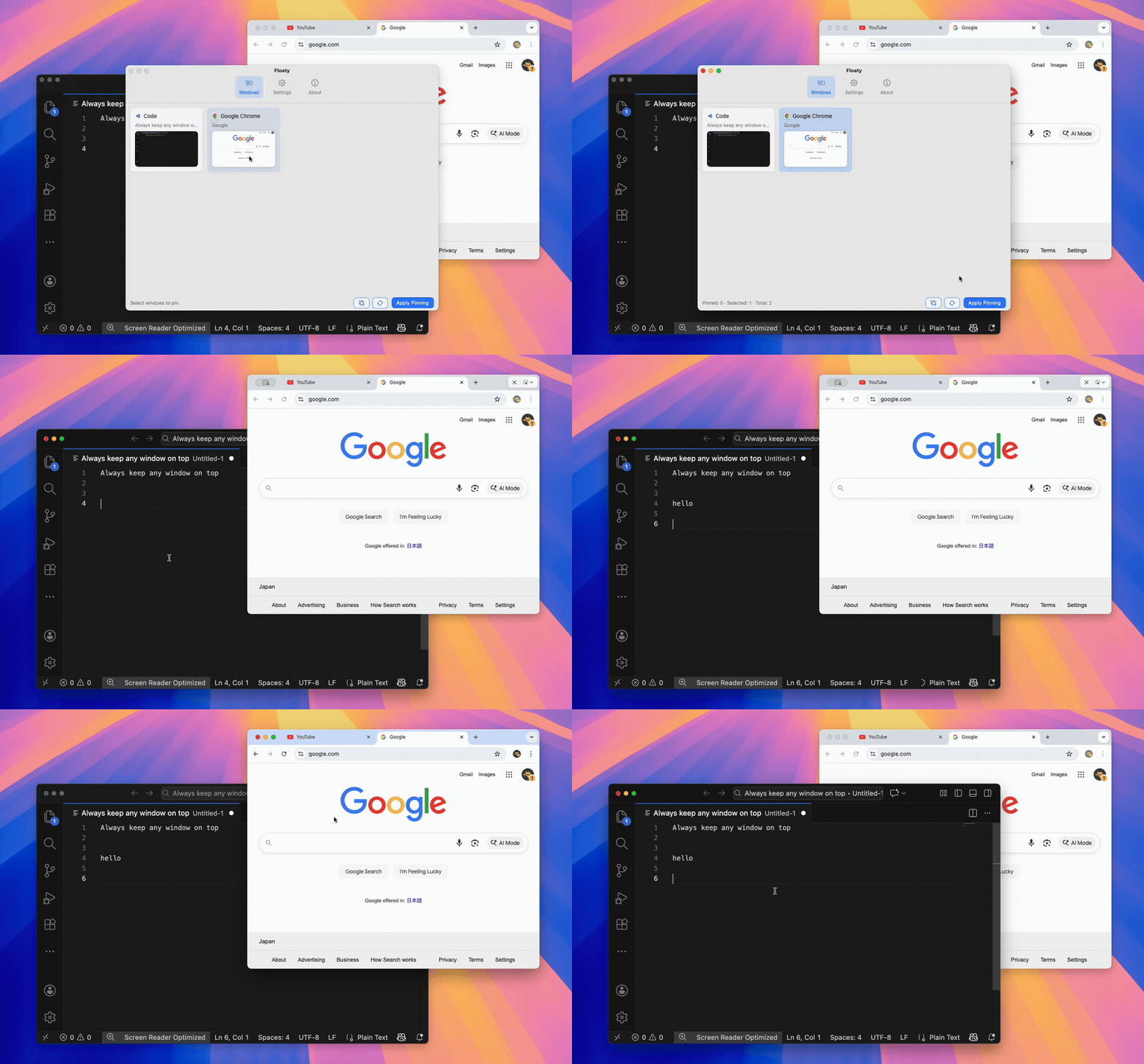
Floaty is the closest match if what you miss is Afloat’s core idea: pick a window and keep it above the rest. Floaty is a modern always-on-top app for Mac.
It is focused on always-on-top window pinning rather than full desktop layout management. That makes it a strong replacement for people who do not want a giant automation app or a complex window manager just to keep one window visible.
Floaty is especially useful for:
- Notes, Notion, Obsidian, and checklists
- Preview, PDFs, specs, and reference docs
- ChatGPT, Claude, browser tools, and AI assistants
- Terminal logs, dev servers, SSH sessions, and test output
- Zoom, Meet, FaceTime, and meeting agendas
- Chrome, Safari, Arc, Finder, VS Code, Xcode, and common Mac apps
Compared with old Afloat-style tools, Floaty adds modern workflow controls:
- Menu bar window list for choosing what to pin
- Multiple pinned windows
- Opacity for reference overlays
- Click-through for passive windows that should not steal input
- Quick unpin when the task is done
- A macOS permission flow built for current systems
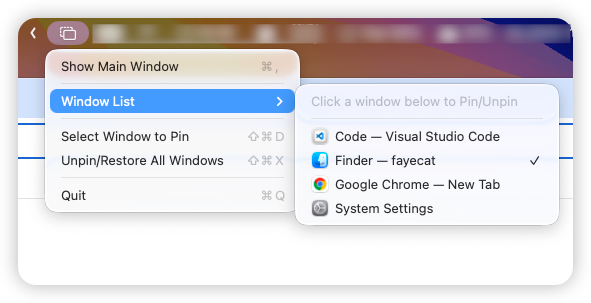
Choose Floaty if you want a dedicated Afloat replacement that feels direct, current, and focused on the always-on-top job.
BetterTouchTool
BetterTouchTool is a powerful automation app. It can be a good Afloat alternative if you already use BTT for gestures, shortcuts, window actions, trackpad customization, or app-specific workflows.
BTT has actions and community presets around pinning or floating a focused window on top. That makes it flexible, especially for people who like building custom triggers.
The trade-off is complexity. If all you want is “make this one window stay on top,” BetterTouchTool can feel like buying a workshop when you only needed a screwdriver.
Choose BetterTouchTool if:
- You already use it daily.
- You want custom gestures or complex triggers.
- Always-on-top is one piece of a larger automation setup.
- You do not mind tuning behavior when macOS changes.
Rectangle Pro
Rectangle Pro is best known as a macOS window manager. It is excellent for snapping, throwing, moving, and arranging windows with keyboard shortcuts and cursor gestures.
Rectangle Pro also includes Pin Mode / Todo Mode-style behavior for keeping an app visible. That makes it useful if your always-on-top need is connected to a broader window layout workflow.
The trade-off is focus. Rectangle Pro is not primarily an Afloat clone. It is a window management tool with a pinning feature. If you already use Rectangle Pro, trying its pin mode makes sense. If you only want always-on-top windows, a dedicated pinning app may feel simpler.
Choose Rectangle Pro if:
- You already use Rectangle or want a full window manager.
- Your main workflow is snapping and arranging windows.
- You want pinning as one feature inside a bigger layout system.
- You do not need opacity or click-through as primary controls.
Afloat Alternatives Compared
| Feature | Afloat | Floaty | BetterTouchTool | Rectangle Pro |
|---|---|---|---|---|
| Works well on modern macOS | No | Yes | Yes | Yes |
| Main purpose | Always-on-top via old plugin injection | Dedicated window pinning | Automation and gestures | Window management |
| Setup difficulty | High / outdated | Low | Medium to high | Low to medium |
| Requires SIP workarounds | Often, in old instructions | No | No | No |
| Multiple pinned windows | Old behavior varied | Yes | Possible | Limited by workflow |
| Opacity controls | Old feature, unreliable today | Yes | Possible with setup | Not the focus |
| Click-through | Old feature, unreliable today | Yes | Possible with setup | Not the focus |
| Best for | Legacy Macs and nostalgia | Afloat users who want a modern replacement | Automation-heavy users | Existing Rectangle Pro users |
Which Afloat Alternative Should You Choose?
Choose Floaty if you want the clearest modern replacement for Afloat. It is built around the exact job Afloat users remember: keep a selected Mac window visible above other windows.
Choose BetterTouchTool if you want always-on-top behavior inside a broader automation system. It is powerful, but it asks you to think in actions, triggers, and presets.
Choose Rectangle Pro if your main problem is window management and layout. Its pinning behavior is useful, but it makes the most sense when you already want the rest of Rectangle Pro.
Avoid old Afloat installers unless you are experimenting on a legacy Mac and fully understand the security trade-offs. On a daily-use Mac, especially one running Sonoma, Sequoia, Tahoe, or Apple Silicon, a modern app is the better answer.
FAQ
Is Afloat still maintained?
Not in the way modern macOS users need. The old Afloat ecosystem is tied to SIMBL-era approaches and older OS X versions, while current macOS releases require safer, actively maintained window tools.
Does Afloat work on macOS Sonoma?
For practical everyday use, you should assume no. Even if an old fork or workaround appears to launch, it is not a reliable recommendation for a modern Sonoma setup.
Does Afloat work on macOS Sequoia or Tahoe?
It is not a dependable choice for Sequoia, Tahoe, or current Apple Silicon Macs. Modern always-on-top utilities are safer and easier to support.
What is the best Afloat alternative for always-on-top windows?
For a dedicated always-on-top workflow, Floaty is the closest match. BetterTouchTool is better for automation-heavy users, while Rectangle Pro is better for people who want full window management.
Is Floaty a full window manager?
No. Floaty is focused on pinning and floating windows. You can use it alongside a window manager if you also want snapping, tiling, or layout automation.
Can a modern Afloat alternative pin Chrome, Safari, Preview, Terminal, or ChatGPT?
Yes. Floaty is designed for normal Mac windows such as browsers, Preview, Finder, Terminal, Zoom, Notion, ChatGPT, Claude, VS Code, and similar apps.
Try Floaty as a Modern Afloat Replacement
If you found this page because an old Afloat recommendation no longer works, Floaty is the modern path: choose a window, keep it visible, and unpin it when the task is done.
Related guides:
- Always-on-top app for Mac
- Rectangle Pro vs Floaty for always-on-top windows
- BetterTouchTool vs Floaty: Always-On-Top Windows on Mac
- macOS always-on-top landscape guide
- How to Pin Any Window on Top on Mac
- Best macOS tools to pin windows always on top
- A Windows Switcher’s Guide to Keeping Apps on Top on Mac
- Keep Terminal Logs Visible While Coding on Mac
Source notes: this article references the public Afloat installer repository and Rectangle’s official Rectangle Pro comparison page.