
BetterTouchTool is a broad Mac automation tool. Floaty is a focused always-on-top window pinning app. That difference matters more than a simple feature checklist.
If you already use BetterTouchTool for gestures, shortcuts, app-specific triggers, Stream Deck actions, or custom workflows, it can make sense to keep window visibility inside that setup. If your main problem is simply “I want this Mac window to stay on top,” Floaty is usually the more direct tool.
This comparison is intentionally narrow. It is not trying to prove that one app is better at everything. It is about one job: keeping Mac windows visible while you work in another app.
Quick Verdict
Choose BetterTouchTool if you want a powerful customization and automation system for your Mac, and always-on-top behavior is just one part of that larger setup.
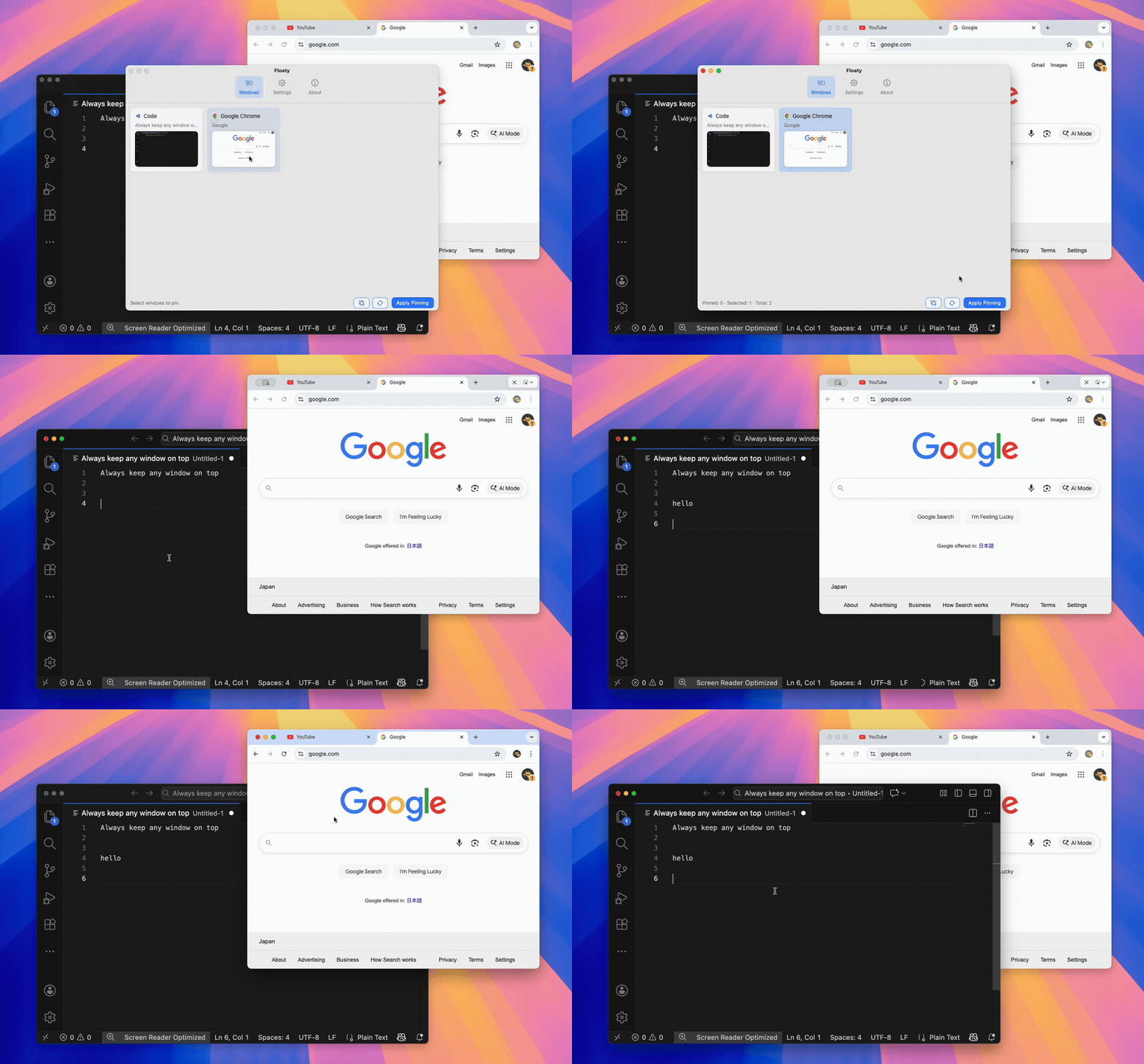
Choose Floaty if you want a dedicated way to choose a window, pin it above other windows, adjust opacity, use click-through, and unpin it when you are done.
You can also use both. BetterTouchTool can handle your gestures and automation, while Floaty handles the specific always-on-top window workflow.
| If you mainly want… | Start with… |
|---|---|
| Gestures, shortcuts, custom triggers, and app-specific automation | BetterTouchTool |
| One normal Mac window to stay visible while you work | Floaty |
| A visual window picker for pinning windows | Floaty |
| A broader personal automation system | BetterTouchTool |
| Opacity or click-through for passive reference windows | Floaty |
| A simple Afloat-style always-on-top replacement | Floaty |
If your search started with BetterTouchTool always on top because you only need one window to stop disappearing, try the simpler pinning workflow first. If you discover that you also want gestures, app-specific rules, and larger automation, BetterTouchTool may be worth adding to your setup.
Why People Compare BetterTouchTool and Floaty
Many Mac users find Floaty while searching for terms like BetterTouchTool always on top, BetterTouchTool always on top window, or BetterTouchTool alternative.
That makes sense because both tools can live near the same user problem:
- You need a window to stay visible.
- You are tired of switching back and forth.
- You want a Mac equivalent of a simple always-on-top behavior.
- You may already use shortcuts, gestures, or window tools.
The overlap is real, but the product focus is different.
BetterTouchTool is closer to a workshop. It gives power users a large set of triggers and actions for shaping how macOS responds to input. Floaty is closer to a single-purpose utility. It is built around selecting windows and keeping them visible.
What BetterTouchTool Is Best At
BetterTouchTool is best when you want deep control over how your Mac behaves.
It is a strong fit if you care about:
- trackpad and mouse gestures
- keyboard shortcuts
- app-specific triggers
- automation-style actions
- custom input workflows
- advanced personal productivity setups
- combining multiple actions into one habit
If you enjoy building your own Mac workflow, BetterTouchTool can be a very capable tool. It is especially useful when one trigger should do several things, or when different apps should behave differently.
For always-on-top use, that flexibility is the point. If you want a custom shortcut or gesture that fits into an existing BetterTouchTool setup, it may be the right place to configure that behavior.
The trade-off is that you are working inside a larger system. That is a benefit for power users, but it can feel like extra setup if all you want is one pinned reference window.
What Floaty Is Best At
Floaty is best when the job is specifically window pinning.
It is built for situations like:
- keeping ChatGPT or Claude visible while coding
- keeping a PDF visible while writing
- keeping Notes, Notion, or a checklist visible during a meeting
- keeping Terminal logs visible while working in an editor
- keeping browser documentation visible without shrinking your main app
- keeping a reference window visible on a single monitor
Floaty does not try to become a full Mac automation suite. The workflow is simpler:
- Open the window you want.
- Choose it in Floaty.
- Apply pinning.
- Adjust opacity or click-through if needed.
- Unpin when the task is done.
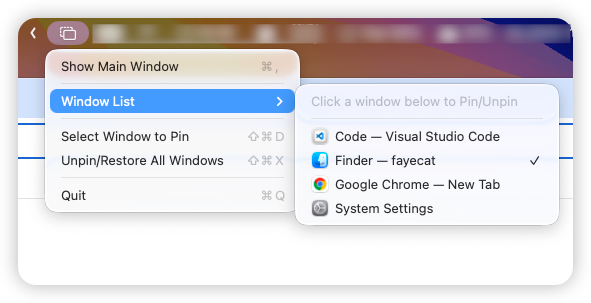
That focus is the advantage. You do not need to design a trigger system before you can keep a window visible.
Feature Comparison
| Question | BetterTouchTool | Floaty |
|---|---|---|
| Main purpose | Mac customization, triggers, gestures, and automation | Dedicated always-on-top window pinning |
| Best user | Power user who wants a custom control system | User who wants a direct window pinning workflow |
| Always-on-top workflow | Can fit into custom trigger/action setups | Core product workflow |
| Setup style | Configure actions, triggers, and behavior | Select a window and pin it |
| Opacity controls for pinned windows | Possible only if you build or combine the right workflow | Built into the Floaty workflow |
| Click-through mode | Not the main product pattern | Built for passive reference windows |
| Multiple pinned reference windows | Depends on setup and workflow | Designed for multiple pinned windows |
| Window list / visual picker | Not the main product pattern | Built around choosing windows from a list |
| Broader automation | Strong | Not the product focus |
| Learning curve | Higher, because the app is powerful | Lower for always-on-top use |
This table is not a full BetterTouchTool feature review. BetterTouchTool does many things Floaty does not attempt to do. The comparison only covers the always-on-top use case.
The important distinction is control surface. BetterTouchTool asks you to define how a trigger should behave. Floaty asks which window should stay visible. For always-on-top work, that difference is usually what decides the better fit.
Where BetterTouchTool Makes More Sense
BetterTouchTool makes more sense when you want always-on-top behavior as part of a bigger Mac customization system.
Pick BetterTouchTool if:
- You already use it daily.
- You like configuring custom triggers.
- You want gestures, keyboard shortcuts, or app-specific actions.
- You want one tool to handle many unrelated Mac workflow tweaks.
- You are comfortable spending time tuning behavior.
- You care more about flexibility than a dedicated pinning interface.
For this kind of user, BetterTouchTool’s strength is not that it is simpler. Its strength is that it is flexible.
If you want a gesture that performs a window action, changes app behavior, or becomes part of a larger workflow, BetterTouchTool is likely the better fit.
Where Floaty Makes More Sense
Floaty makes more sense when the task is simply keeping a window visible.
Pick Floaty if:
- You want a fast way to pin a normal Mac window.
- You do not want to configure a larger automation system.
- You want a visual list of windows to choose from.
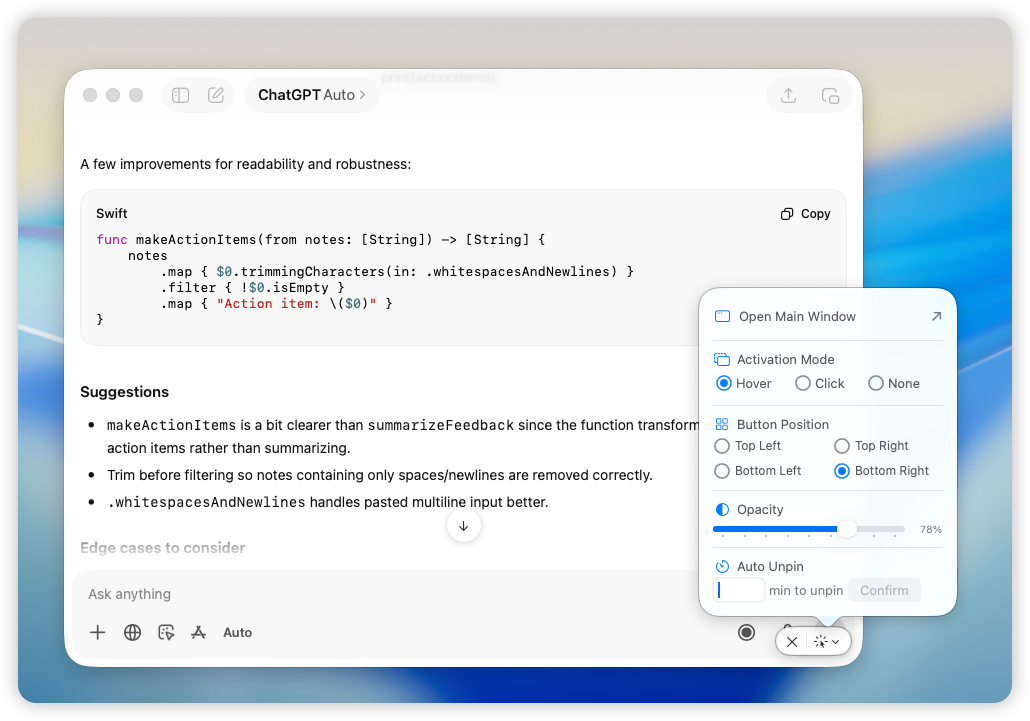
- You want opacity controls for a floating reference window.
- You want click-through for passive overlays.
- You want to pin more than one reference window.
- You are replacing an old Afloat-style workflow.
Floaty is especially useful when the window is not the main app. It is the supporting context: a PDF, AI assistant, checklist, terminal log, meeting agenda, or browser reference.
Example Workflows
Coding with an AI assistant
BetterTouchTool makes sense if you want a keyboard shortcut or gesture-based workflow around your editor, browser, and AI assistant.
Floaty makes sense if you just want ChatGPT or Claude to stay visible while you keep typing in VS Code, Xcode, Cursor, or Terminal.
Read the ChatGPT and Claude always-on-top guide for the focused workflow.
Reading documentation while programming
BetterTouchTool can be useful if documentation visibility is part of a broader automation setup.
Floaty is more direct if you want to pin Safari, Chrome, Preview, or a docs page above your editor without changing your whole desktop layout.
Read the Chrome and Safari always-on-top guide.
Working from a PDF
BetterTouchTool can be part of a power-user setup for moving windows and triggering app-specific behaviors.
Floaty is more direct if you need a PDF, contract, spec, or research paper to stay above a writing or design app.
Read the PDF and Preview always-on-top guide.
Meetings and notes
BetterTouchTool is useful if your meeting workflow depends on custom shortcuts, app switching, or automations.
Floaty is useful if the goal is to keep Notes, Notion, Zoom, a transcript, or an agenda visible while you click into other apps.
Read the Notes always-on-top guide or the Zoom always-on-top guide.
BetterTouchTool vs Floaty for Always-On-Top Windows
If you search specifically for BetterTouchTool always on top, the real question is not whether BetterTouchTool is powerful. It is.
The question is whether you want to solve always-on-top through a general automation tool or through a focused window pinning tool.
BetterTouchTool is a better fit when:
- you already use BTT
- you want custom triggers
- you want window visibility to be one part of a larger automation flow
- you are comfortable configuring and maintaining that setup
Floaty is a better fit when:
- you want to pin windows quickly
- you want built-in opacity and click-through controls
- you want a visible window list
- you want a simpler app for one job
Neither approach is wrong. They serve different habits.
Can You Use BetterTouchTool and Floaty Together?
Yes. For many power users, the cleanest setup is to let each tool do what it is best at.
Use BetterTouchTool for:
- gestures
- shortcuts
- app-specific triggers
- workflow automation
- input customization
Use Floaty for:
- pinning windows
- keeping references visible
- opacity
- click-through
- managing multiple pinned windows
That setup avoids forcing one app to solve every problem.
Which One Should You Install?
Install BetterTouchTool if you want a broad Mac customization tool and you enjoy building your own workflow.
Install Floaty if the problem you want to solve today is direct: one window keeps disappearing, and you want it to stay visible.
If you are not sure, start from the job you are trying to finish:
- If the job is “customize how my Mac responds to input,” choose BetterTouchTool.
- If the job is “keep this window on top while I work,” try Floaty.
FAQ
Is BetterTouchTool better than Floaty?
BetterTouchTool is the stronger fit for broad Mac automation, gestures, shortcuts, and custom triggers. Floaty is the more focused fit for an always-on-top window workflow. The better app depends on the job.
Can BetterTouchTool keep a window always on top?
BetterTouchTool can fit into always-on-top or window visibility workflows through its action and trigger system. If you already use BTT, it is worth checking your current version’s available window-related actions and presets.
Is Floaty a BetterTouchTool replacement?
No. Floaty does not replace BetterTouchTool’s gestures, triggers, automation, or input customization. Floaty is focused on pinning and floating windows.
Is BetterTouchTool overkill for always-on-top windows?
It can be, depending on the user. If you already use BetterTouchTool, adding an always-on-top workflow there may be natural. If you only want to pin one window, Floaty is simpler.
Which is easier for pinning a Mac window?
Floaty is easier for the dedicated pinning workflow because the app is built around selecting and pinning windows. BetterTouchTool is more flexible, but it usually asks you to think in actions and triggers.
Can I use Floaty with BetterTouchTool?
Yes. You can use BetterTouchTool for automation and gestures while using Floaty for always-on-top windows.
Try Floaty for Dedicated Window Pinning
If your main reason for comparing these apps is that you need one Mac window to stay visible, Floaty is built for that exact workflow.
Try it with one real task: pin a PDF, note, browser doc, Terminal log, or AI assistant window while you work in another app. If that solves the problem, you may not need a larger setup for this specific job.
If you already love BetterTouchTool, keep using it. If you came here because you want a faster path to always-on-top windows, Floaty is the shorter route to test.
Related guides: