
Magnet is a window snapping app. Floaty is an always-on-top window pinning app. They can both make a Mac workspace easier to manage, but they are built around different habits.
If you searched for Magnet always on top or Magnet alternative, the key question is whether you want better window layout or a window that stays visible after you click into another app.
Use Magnet when the problem is layout: you want windows to snap into halves, thirds, quarters, or other clean positions with shortcuts, drag areas, or menu commands.
Use Floaty when the problem is visibility: you want one specific window to stay above other windows while you keep working somewhere else.
This comparison is intentionally narrow. Magnet is not a bad choice because it is layout-focused. Floaty is not a replacement for Magnet’s snapping workflow. The question is simpler: are you trying to arrange windows, or keep a window on top?
Quick Verdict
Choose Magnet if you mostly want faster window layout on Mac: snapping windows to screen edges, moving apps into tidy regions, and controlling window positions with keyboard shortcuts.
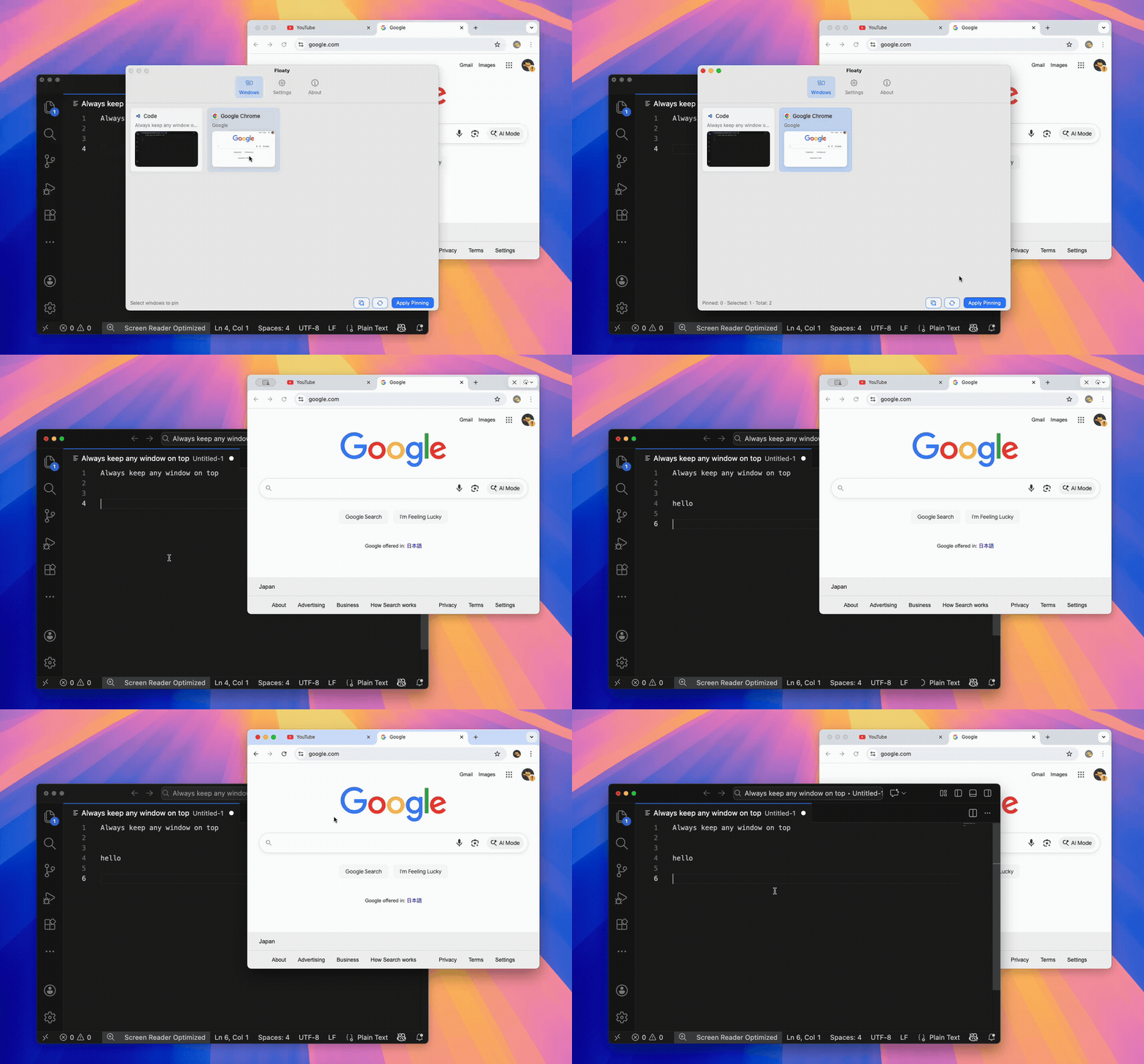
Choose Floaty if you mostly want an always-on-top app for Mac: pinning a PDF, note, AI chat, browser page, Terminal log, video, or reference window above the app you are actually using.
You can also use both. Magnet can organize your desktop layout, while Floaty can keep the one reference window visible when layout alone is not enough.
| If you mainly want… | Start with… |
|---|---|
| Snap windows into halves, thirds, or corners | Magnet |
| Move and resize windows quickly with shortcuts | Magnet |
| Keep one normal Mac window visible above others | Floaty |
| Add opacity to a pinned reference window | Floaty |
| Use click-through for a passive overlay | Floaty |
| Replace an old Afloat-style always-on-top workflow | Floaty |
Choose in 30 Seconds
If you are deciding quickly, use this rule:
- Choose Magnet when the window needs a better place on the screen.
- Choose Floaty when the window is already in the right place but keeps getting covered.
For example, arranging Safari and Notes side by side is a Magnet-style problem. Keeping ChatGPT, a PDF, a Terminal log, or meeting notes visible while another app has focus is a Floaty-style problem.
That distinction matters because a snapped window can still disappear behind the active app. Always-on-top pinning solves a different layer of the workflow.
Why People Compare Magnet and Floaty
People often search for Magnet vs Floaty, Magnet alternative, or Magnet always on top because the underlying frustration feels similar:
- windows keep covering each other
- the important reference disappears
- macOS does not have a simple built-in always-on-top command
- single-monitor work gets crowded
- switching windows breaks focus
But there are two different solutions hiding inside that frustration.
One solution is better layout. If your apps are arranged well, you may not need a pinned window. This is where Magnet is useful.
The other solution is persistent visibility. Sometimes a window needs to stay visible even when another app has focus. This is where Floaty is useful.
What Magnet Is Best At
Magnet is best for arranging windows quickly.
It fits workflows where you want to:
- snap a browser to the left side of the screen
- put a writing app on the right
- move a window into a corner
- use keyboard shortcuts instead of dragging
- make better use of an external monitor
- keep common app layouts clean and repeatable
That is a strong workflow. Many Mac users install Magnet because macOS window positioning can feel slow compared with Windows snapping or dedicated layout tools.
Magnet’s official positioning is about window organization: snapping, tiling, keyboard shortcuts, trigger areas, menu bar controls, and support for multi-display workflows. If that is the problem you are solving, Magnet is the right category of tool to consider.
The important trade-off: layout tools usually help you decide where windows should go. They are not primarily built around which window should stay above everything else while you interact with another app.
What Floaty Is Best At
Floaty is best for always-on-top window pinning.
It fits workflows where the window is not necessarily part of a perfect layout. It is supporting context that needs to remain visible:
- ChatGPT or Claude while coding
- a PDF while writing
- Apple Notes during a Zoom call
- a browser docs page above VS Code
- a Terminal log while testing
- a checklist while recording a tutorial
- a video or dashboard on a single monitor
The Floaty workflow is direct:
- Open the window you want to keep visible.
- Choose it in Floaty.
- Apply pinning.
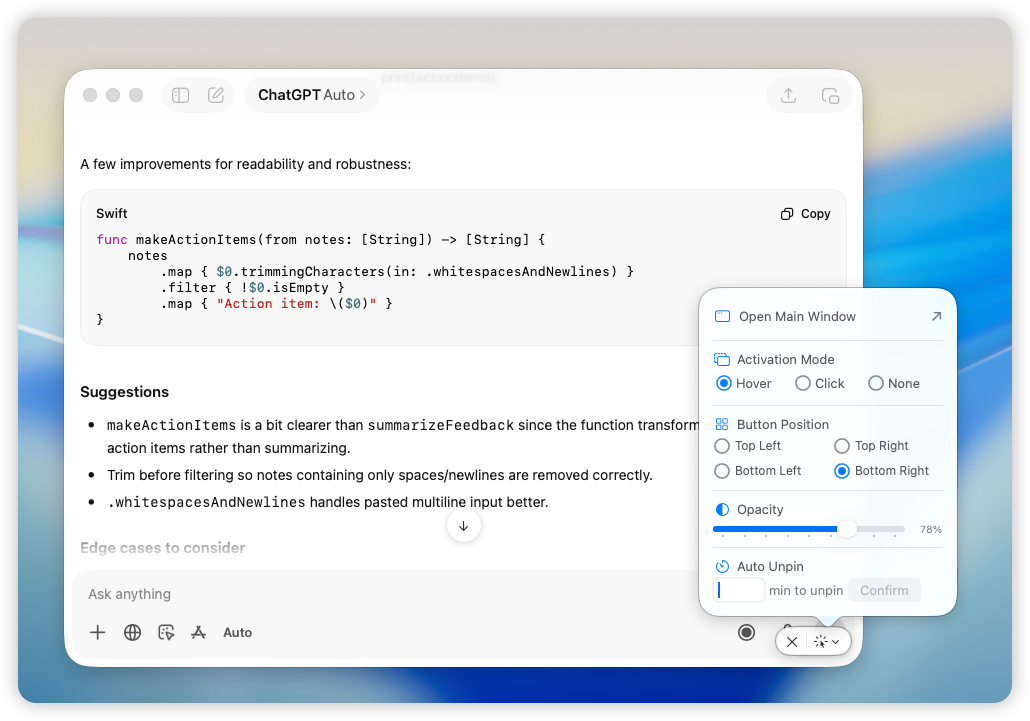
- Adjust opacity or click-through if needed.
- Unpin it when the task is done.
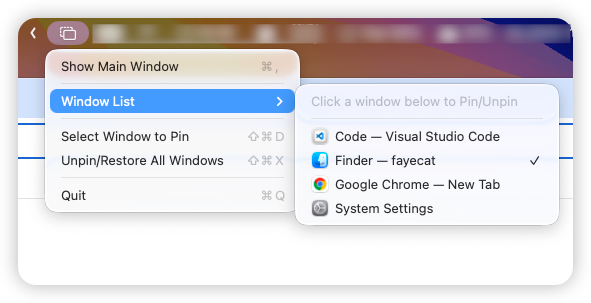
Floaty does not try to become a full window manager. That is the point. It is built around the moment when a normal app window should stop disappearing behind the rest of your work.
Feature Comparison
| Question | Magnet | Floaty |
|---|---|---|
| Main purpose | Window snapping and layout | Always-on-top window pinning |
| Best user | Someone who wants faster window arrangement | Someone who wants a reference window to stay visible |
| Core workflow | Move windows into screen regions | Select a window and pin it above others |
| Keyboard shortcuts | Core part of the workflow | Available for pinning-focused actions |
| Drag-to-snap behavior | Core part of the workflow | Not the product focus |
| Menu bar controls | Part of the Magnet workflow | Used for selecting and managing windows |
| Opacity for pinned windows | Not the main workflow | Built into Floaty Pro |
| Click-through overlays | Not the main workflow | Built into Floaty Pro |
| Multiple pinned windows | Not the main workflow | Built for multiple floating windows |
| Best fit | Clean layout and window positioning | Persistent visibility and reference windows |
This table is not trying to turn Magnet into an always-on-top app. Magnet is valuable because it is good at layout. The point is that layout and pinning are different jobs.
The Real Difference: Layout vs Visibility
Magnet helps when windows need better positions.
For example, you might use Magnet to put:
- Safari on the left
- Notes on the right
- Terminal at the bottom
- Finder on an external display
That solves a lot of multitasking pain.
Floaty helps when position is not enough.
For example, you might want:
- ChatGPT floating above VS Code while you type
- a PDF visible above Pages
- a Zoom agenda visible while another app has focus
- a Terminal log visible above a browser
- a YouTube tutorial visible without shrinking your main app
In those cases, a window can be perfectly arranged and still disappear when you click elsewhere. Floaty is for that second problem.
Where Magnet Makes More Sense
Pick Magnet if:
- You want a simple Mac window manager.
- You want windows to snap into consistent screen regions.
- You prefer keyboard shortcuts for window positions.
- You use external monitors and want faster window placement.
- You do not need opacity, click-through, or pinned overlays.
- Your main pain is messy layout, not disappearing reference windows.
Magnet is especially useful if your workflow is based on side-by-side work. A browser on one side and a document on the other is a layout problem, and Magnet is designed for that kind of problem.
Where Floaty Makes More Sense
Pick Floaty if:
- You want a specific window to stay above others.
- You want a focused always-on-top workflow.
- You need a visual list of windows to choose from.
- You want opacity for reference windows.
- You want click-through for passive overlays.
- You want to pin more than one reference window.
- You are looking for a modern Afloat-style replacement.
Floaty is strongest when the reference window is small, temporary, or context-heavy. It might not deserve half the screen, but it should not disappear.
Example Workflows
Coding with docs or AI
Magnet is useful for placing your editor, browser, terminal, and simulator into clean positions.
Floaty is useful when one supporting window should stay above the editor: ChatGPT, Claude, API docs, a Terminal log, or a small browser reference.
Read the ChatGPT and Claude always-on-top guide or the Terminal always-on-top guide.
Writing from a PDF
Magnet can place Preview and your writing app side by side.
Floaty is better when the PDF should hover above your writing app, especially if you only need a small section of the document visible.
Read the PDF and Preview always-on-top guide.
Meetings and notes
Magnet can arrange Zoom, Calendar, Notes, and a browser into a clean meeting layout.
Floaty can keep an agenda, checklist, transcript, or notes window visible while you click into another app.
Read the Notes always-on-top guide or the Zoom always-on-top guide.
Watching tutorials while working
Magnet can place a browser beside your work app.
Floaty is useful when you want the browser window or video reference to stay visible above your work, especially on a single monitor.
Read the guide to watching YouTube while working on Mac.
Magnet Alternative for Always-On-Top Windows
Only if the thing you want from Magnet is not really snapping.
Floaty is not a Magnet replacement for window layout. It does not try to replace snapping, trigger areas, or keyboard-driven window positioning.
Floaty is a Magnet alternative only for a narrower problem: keeping important windows visible. If your search for “Magnet alternative” really means “I need a Mac window to stay on top,” then Floaty is worth trying.
If your search means “I want a better way to arrange windows,” Magnet, Rectangle, Rectangle Pro, and Moom are the more relevant category.
This is the most honest way to compare them:
| Search intent | Better fit |
|---|---|
| “Magnet alternative for snapping” | Another window manager |
| “Magnet alternative for always on top” | Floaty |
| “Magnet always on top” | A dedicated always-on-top app |
| “Mac window manager with shortcuts” | Magnet or another layout tool |
| “Pin a Mac window above others” | Floaty |
Can You Use Magnet and Floaty Together?
Yes. That is often the cleanest setup.
Use Magnet for:
- snapping windows
- arranging apps
- moving windows between regions
- keyboard-based layout
Use Floaty for:
- pinning windows
- keeping references visible
- opacity
- click-through
- multiple floating windows
This avoids forcing one app to solve every window problem.
Which One Should You Install?
Install Magnet if your main problem is window layout.
Install Floaty if your main problem is always-on-top visibility.
If you are unsure, ask one question:
Do I need this window to move into the right place, or do I need it to stay visible after I click somewhere else?
If it needs to move into the right place, try Magnet. If it needs to stay visible, try Floaty.
FAQ
Is Magnet better than Floaty?
Magnet is better for window snapping and layout. Floaty is better for always-on-top window pinning. The better choice depends on whether your problem is arrangement or visibility.
Is Floaty a Magnet replacement?
No. Floaty does not replace Magnet’s snapping and layout workflow. Floaty is a focused always-on-top app for keeping selected windows visible above other windows.
Is Floaty a good Magnet alternative for always-on-top windows?
Yes, if your reason for looking beyond Magnet is that you need a window to stay visible above other apps. If you need snapping, shortcuts, and layout management, Magnet or another window manager is the better category.
Does Magnet keep windows always on top?
Magnet is primarily a window snapping and layout app. If your main goal is always-on-top pinning, use a dedicated tool such as Floaty or compare broader options in the always-on-top Mac guide.
Can I use Magnet and Floaty together?
Yes. Use Magnet to arrange windows and Floaty to keep selected windows visible above the arranged layout.
Which is easier for pinning a Mac window?
Floaty is easier for the dedicated pinning workflow because it is built around selecting a window and keeping it on top.
Try Floaty for Always-On-Top Windows
If you are comparing Magnet and Floaty because one window keeps disappearing, test the focused workflow first.
Pin a PDF, browser doc, Terminal log, AI assistant, checklist, or video window while you work in another app. If that solves the problem, you probably needed always-on-top behavior more than another layout command.
Related guides:
- Always On Top for Mac: Keep Any Window Visible
- How to Pin Any Window on Top on Mac
- Rectangle Pro vs Floaty: Window Manager or Always-On-Top App
- BetterTouchTool vs Floaty: Always-On-Top Windows on Mac
- Afloat Alternative for macOS in 2026
- Best macOS tools to pin windows always on top
Source notes: this article references Magnet’s official product page at magnet.crowdcafe.com, Magnet’s official Mac App Store listing, and Floaty’s own product documentation and screenshots.